MCP Security Risks: Understanding Threats, Vulnerabilities, and Mitigation Strategies
Learn the top MCP security risks, including prompt injection, tool poisoning, unauthorized access, and data leakage, plus mitigation strategies.

Sucharitha
2026 State of Agentic AI Security
How ready is your organization to secure AI agents?
3 quick questions. See how you compare to other security leaders.
Model Context Protocol landed in November 2024. And by mid-2025, downloads climbed from 100,000 to over 8 million, with deployments confirmed at hundreds of Fortune 500 companies.
Every major AI platform, from OpenAI to Google and Microsoft, followed suit.
MCP gives AI agents real reach via files, databases, APIs, code execution, and multi-step actions across systems. The attack surface is ever-increasing.
This blog gives a full breakdown of MCP security risks, hidden vulnerabilities, and operationalizing the security framework.
What is Model Context Protocol (MCP) and How Does It Work?
The Model Context Protocol (MCP) is an open-source standard developed by Anthropic that enables AI assistants, such as Claude and ChatGPT, to securely access and interact with external data sources, applications, and services.
MCP follows a client-server architecture where an MCP host establishes connections to one or more MCP servers, creating one dedicated client per server.
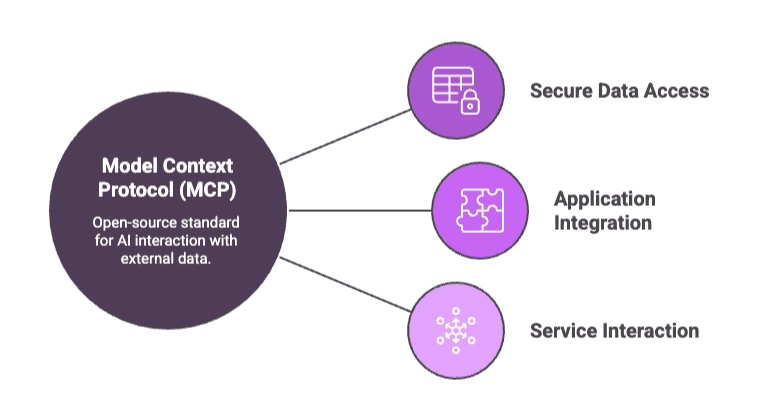
The servers are where the tools actually live: database connectors, file readers, API wrappers, code executors. All communication between clients and servers travels over JSON-RPC in a stateful session.
MCP now integrates across major LLMs, IDEs, and AI agents, and leading cloud platforms have moved toward treating it as the default interoperability layer for enterprise AI.
That standardization is what makes it foundational for agentic AI.
How MCP Works in Agentic AI Workflows
When a user gives an agent a task, the host application receives it and passes it to the LLM along with a list of available tools. The LLM decides which tools are needed, and the host calls the appropriate servers to execute the task.
Tool outputs flow back through the client into the LLM's context, where the model decides whether the task is complete or whether it needs to call another tool.
That loop is the core of every agentic workflow, and it runs without a human checkpoint at each step.
In multi-agent setups, the picture gets more complex.
Agents can modify state through tools or MCP connections, including sending emails, executing SQL, and modifying code, with full access to everything the agent's permissions allow.
Why MCP Is a Unique Security Challenge for AI Agent Security
Traditional API security assumes a deterministic approach.
But in MCP, the executions allow AI agents to make dynamic decisions about which MCP tools to use and how to use them, which changes how risk propagates through the environment and introduces new exposure classes.
Also, trust boundaries expand with every new connection. Every connection between an AI assistant and an MCP server can carry prompts, tokens, configurations, and executable schemas, and each element is a potential entry point for exploitation.
Unlike conventional APIs, MCP servers face threats from AI agents that can execute thousands of requests per minute.
Top MCP Security Risks and Attack Surfaces
MCP security risks are ever-evolving. We’ve listed down the top ones and their respective attack surfaces:
Prompt Injection and Context Manipulation
Prompt injection is ranked the number one vulnerability in the OWASP Top 10 for Large Language Model Applications 2025.
In MCP environments, it is more dangerous than in standard LLM deployments because the protocol gives agents real tools to execute and not just generate text.
1. Direct Prompt Injection Attacks
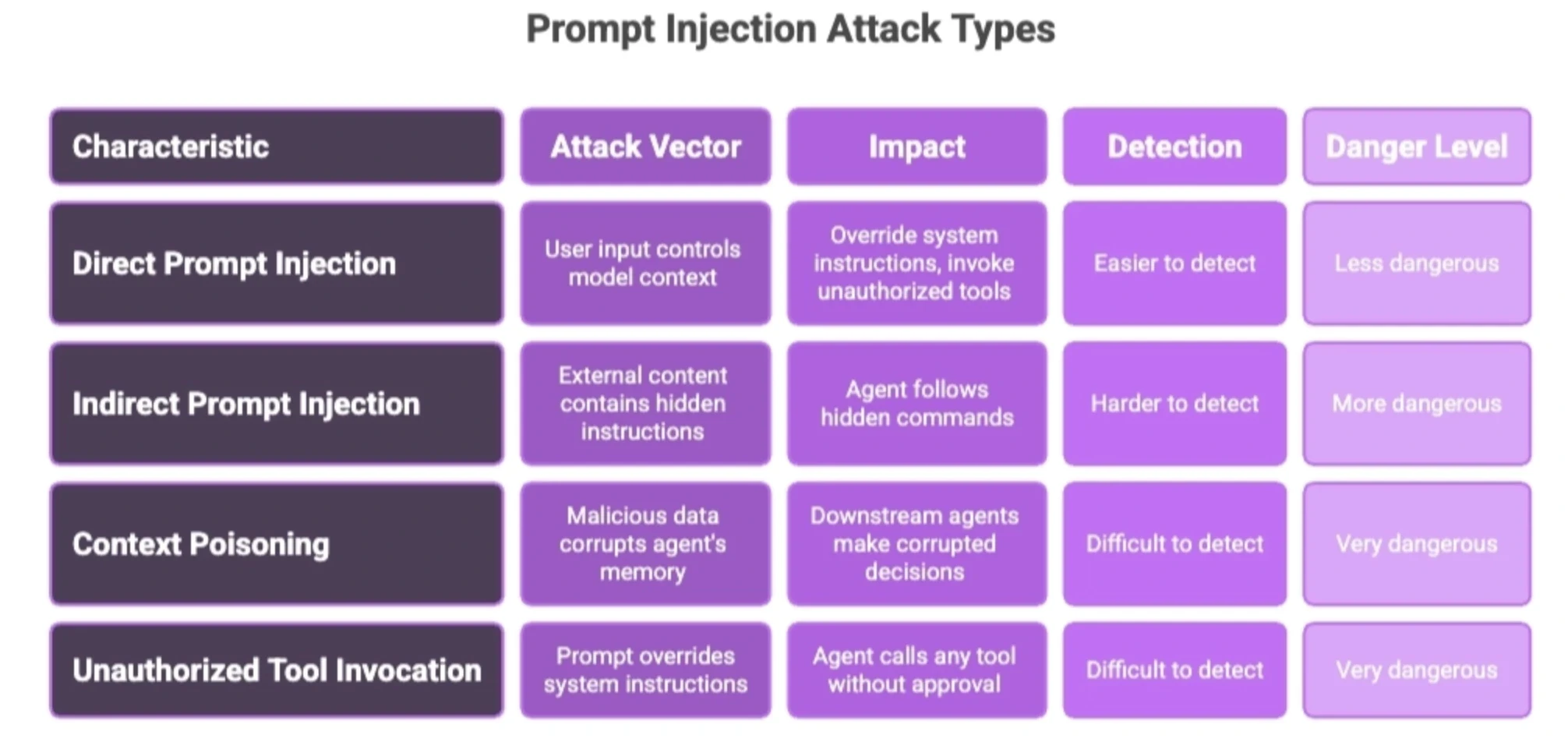
Direct injection is the simpler variant in which an attacker controls the input that reaches the model's context window and uses it to override system instructions. In an MCP setup, this can mean crafting a user request that instructs the agent to invoke tools it should not, skip authorization checks, or leak data from connected systems.
2. Indirect Prompt Injection Through Tool Responses
Indirect injection is harder to detect and more dangerous.
Attackers embed instructions in external content that the agent retrieves, such as a webpage, a document, a GitHub issue, or cached data. When the agent processes this content, it follows the hidden commands.
3. Context Poisoning and Manipulation
Context poisoning targets the agent's memory and reasoning state rather than individual tool calls. Injected malicious data propagates through the workflow, causing downstream agents to make decisions based on corrupted inputs.
4. Unauthorized Tool Invocation Through Prompts
The MCP specification explicitly acknowledges this risk, stating that there should always be a human in the loop with the ability to deny tool invocations.
However, in practice, most production deployments skip the human checkpoint entirely. A successfully injected prompt can call any tool the agent has access to, with no additional approval required.
Tool Poisoning and Supply Chain Attacks
1. Malicious MCP Tool Registries
The first malicious MCP package appeared in public registries in September 2025. Typosquatting, dependency injection, and fake "official" servers have become common attack patterns.
2. Compromised Plugins and Extensions
Tool poisoning embeds malicious instructions inside MCP tool descriptions. LLMs use this metadata to decide which tools to invoke, and compromised descriptions can manipulate the model into executing unintended tool calls.
3. Unsafe Third-Party Integrations
MCP environments rely heavily on third-party components such as SDKs, connectors, protocol servers, vector database clients, and plugins. Because these modules often run inside trusted execution paths.
A compromised dependency can alter agent behavior, introduce hidden backdoors, or modify protocols without triggering detection.
How Do Confused Deputy Attacks and Authorization Failures Impact MCP Security?
A "deputy" is an application or process that holds legitimate, high-level privileges. The problem occurs when a less-privileged entity tricks the deputy into misusing those privileges to perform actions outside its intended scope.
1. Excessive Permission Delegation
AI agents are frequently granted access via service accounts or API tokens that provide broad privileges over corporate resources. This contrasts with traditional software, where the principle of least privilege is standard. These over-privileged tokens are highly valuable to attackers and prone to exploitation.
2. Unauthorized Cross-Tool Actions
In an MCP-based agentic system, a user's request may pass through an orchestrating agent, touch one or more intermediate MCP servers, and finally reach a downstream tool or API.
Each step makes decisions on behalf of the original caller and is a potential confused deputy.
3. Improper Identity Propagation
A tenant isolation flaw, for example, can cause cross-organization data contamination. Without proper identity tracing across every step, MCP servers and endpoints cannot determine the actual provenance of a request.
4. Privilege Escalation Risks
MCP servers acting on behalf of users without proper authorization checks allowed privilege escalation through OAuth token confusion, where the server could hold tokens for multiple users but failed to properly isolate actions between them.
How Do Session Hijacking and Local Server Compromise Threaten MCP Security?
1. MCP Session Token Theft
MCP session token theft is an attack in which threat actors steal or intercept authentication tokens used by an AI assistant to connect to external applications and data sources, allowing them to impersonate the assistant and access connected services.
2. Cross-Agent Session Reuse
Attackers can exploit predictable session IDs by rapidly creating and destroying sessions, logging the IDs, and then waiting for those same IDs to be reassigned to legitimate client sessions.
Once a session ID is reused, the attacker can send requests using the hijacked ID to request tools, trigger prompts, or inject commands, and the server will forward them as legitimate.
3. Local MCP Server Exploitation
This threat occurs when an attacker abuses vulnerabilities, misconfigurations, or excessive permissions in a locally running MCP server to gain unauthorized access to data, tools, or system resources.
4. Runtime Context Manipulation
During a session, an attacker who has hijacked a session ID can inject their own malicious prompts mid-flow.
The client receives and acts on the attacker's poisoned response instead of the legitimate server response, redirecting agent behavior without any visible indicator to the user.
Token Exposure and Credential Leakage
In MCP-based systems, tokens and credentials serve as the primary means of authentication between models, tools, and servers. Developers frequently mishandle these secrets by embedding them in configuration files, environment variables, prompt templates, or allowing them to persist in model context memory.
Key exposure patterns are:
Unsafe token passthrough: Since MCP enables long-lived sessions and context persistence, tokens can be stored, indexed, or retrieved later through user prompts, system recalls, or log inspection.
API key leakage through logs: System debug logs containing raw MCP payloads that include tokens passed in tool calls have been exploited by attackers with read access to retrieve credentials and push unauthorized code to production.
Secrets exposed in prompts: A malicious user can inject an instruction into shared context memory, causing the model to include stored secrets in responses.
Shared session vulnerabilities: A single MCP server that holds credentials for multiple systems, such as Slack, GitHub, and Salesforce, becomes a single point of failure. Compromising it once means breaching all of them.
MCP Vulnerabilities and Hidden Deployment Risks
Common MCP Server Misconfigurations
Most MCP security incidents are misconfigurations that have been running in production since day one.
The most common ones are:
Over-permissive tool access: Scope creep occurs when temporary or narrowly scoped permissions granted to an agent are expanded over time or until the agent holds broad or administrative privileges across repositories, cloud APIs, ticketing, and CI/CD systems.
Weak authentication settings: Are widespread at the infrastructure level.
Lack of runtime isolation: A compromised MCP server process runs with full host privileges. For example, the EscapeRoute vulnerabilities in the Filesystem MCP server allowed attackers to bypass intended file access restrictions and execute arbitrary code on the host.
Weak Auditability and Visibility Gaps
You cannot investigate what you did not log, and most MCP deployments log very little.
That means tool calls, session events, and agent decisions are largely invisible to existing monitoring infrastructure.
Missing runtime metrics leaves security teams with no record of which tools were called and by what agent.
Insufficient logging is itself listed as a top MCP risk i.e., no audit trail of which tools were called with what arguments means no forensic basis for investigation.
Compliance and Governance Risks
MCP creates compliance exposure that most governance frameworks are not yet equipped to handle.
Few recurrent risks are:
Sensitive data exposure: Happens because context is not scoped by default. An agent processing customer data can pass that context into tools that have no business accessing it, breaking data isolation requirements that regulations like GDPR and HIPAA assume are enforced at the application layer.
Regulatory compliance failures: When an agent exfiltrates data through a legitimate tool channel, there is no policy violation at the tool level. The breach happened in the protocol layer, outside the perimeter your compliance controls were built around.
Unmonitored AI actions: Are the governance gap regulators are starting to ask about. Agents executing SQL, sending emails, modifying code, and calling external APIs without a human approval step create a chain of irreversible actions with no audit trail.
Governance blind spots: Emerge when security teams treat MCP as a developer tooling problem rather than an enterprise risk. Without ownership, policy, and review processes applied to MCP deployments, agentic systems accumulate permissions and integrations that nobody has formally approved or assessed.
What are the Best Practices for MCP Security?
Implementing MCP security best practices is critical for protecting AI agents, connected tools, and enterprise data. These practices help organizations reduce the risk of prompt injection attacks, unauthorized tool access, sensitive data exposure, and other emerging AI security threats. By following the recommendations below, security teams can build secure, compliant, and resilient MCP deployments across their AI ecosystems.
Authentication and Authorization Best Practices
Strong identity verification: Require mutual TLS between MCP clients, agents, and servers. Use short-lived, scoped tokens tied to specific sessions and permissions, and validate every token on the server side without trusting client-provided claims.
Least privilege access: Grant agents only the permissions required for the specific task at hand. Cumulative scope increases across MCP deployments can transform a low-risk automation into a high-impact attack surface.
Role-based access control: Adopt RBAC or ABAC models so that agents are scoped by role and not by what they happen to have inherited. Deny by default, if any unrecognized agent or scope should be blocked automatically.
Session-bound authentication: Perform token exchange at every trust boundary. Never pass through tokens received from upstream callers. This is the direct mitigation for the confused deputy class of failures.
Scope Minimization for MCP Tools
Restrict tool permissions at registration: Define explicit allow-lists of what each tool can access. Broad scopes like files:* or admin:* should never ship as defaults.
Limit runtime capabilities: Evaluate permissions per request, not per session. An agent authorized to read a file at 9am should not retain that authorization indefinitely.
Context-aware access policies: Tie tool access to the specific task context that triggered it. An agent processing a support ticket should not have the same tool access as one running a deployment workflow, even if they share the same underlying identity.
Tool Registry Governance and Supply Chain Hygiene
Verify MCP plugins before installation: Treat every third-party MCP server as untrusted until you have verified its source, reviewed its tool descriptions, and confirmed it has not changed since approval.
Validate dependency integrity: Generate SBOMs and CBOMs for each MCP server and plugin package. Pin dependency versions and verify checksums on every build.
Manage registry trust explicitly: Do not rely on default package resolution. Attackers publish dependencies to public registries using the same names as internal MCP plugins, and agents pull the attacker's version.
Enforce secure update pipelines: Re-approve tools after any update to their descriptions or behavior.
Runtime Monitoring and Incident Response
Monitor runtime activity at the protocol level: Build or adopt monitoring that captures tool invocations, session events, and agent decisions with enough context to reconstruct what happened.
Detect behavioral anomalies: Focus on volumetric baselines, unusual tool invocation patterns, and cross-system access sequences that do not match expected workflows.
Automate alerting on high-risk actions: Flag tool calls that touch production systems, trigger external communications, or request elevated permissions without a matching authorization event.
Define incident response workflows for agentic systems: MCP incidents involve autonomous chains of actions that may have already propagated across multiple tools and systems before detection. Response procedures need to account for rollback, session revocation, and cross-server containment.
What Does Operationalizing MCP Security Look Like in Practice?
Continuous Discovery and Inventory of MCP Assets
You cannot secure what you have not found.
Most organizations deploying MCP have no central inventory of which servers are running, which tools are connected, or which external integrations have been authorized.
Discover MCP servers across environments: Scan for MCP server processes and endpoints across dev, staging, and production. Shadow MCP deployments spun up by individual teams are common and carry the same risk as sanctioned ones.
Map connected tools and integrations: Document every tool registered to every server, including its description, permission scope, and external dependencies. This map is your attack surface.
Track external integrations: Third-party MCP servers that connect to external APIs or SaaS platforms need to be inventoried separately. Each one is a trust relationship your security program has implicitly accepted.
Identify unmanaged deployments: Rug-pull updates, unsigned packages, and automatic reloads mean that an MCP server you approved last month may be running materially different code today. Continuous discovery catches drift that point-in-time reviews miss.
Security Posture Management for MCP
Discovery gives you the inventory. Posture management tells you what is wrong with it.
Configuration drift detection: Small, cumulative scope increases can transform a low-risk automation into a high-impact attack surface. Automated drift detection compares current configurations against approved baselines and flags deviations before they compound. MCP Manager
Continuous risk assessment: Static assessments done at deployment time miss the risks that emerge as tools are added, updated, or connected to new systems. Risk scoring needs to run continuously against live configuration state.
Exposure visibility: Surface which MCP servers are externally reachable, which tools have broad scopes, which sessions are long-lived, and which credentials have not been rotated. These are the inputs to prioritized remediation.
Policy compliance tracking: Map MCP configurations to your existing compliance requirements under GDPR, SOC 2, or HIPAA. Gaps between what your policy says and what your agents can actually do are compliance findings, not just security ones.
Automated Red Teaming and Attack Simulation for MCP
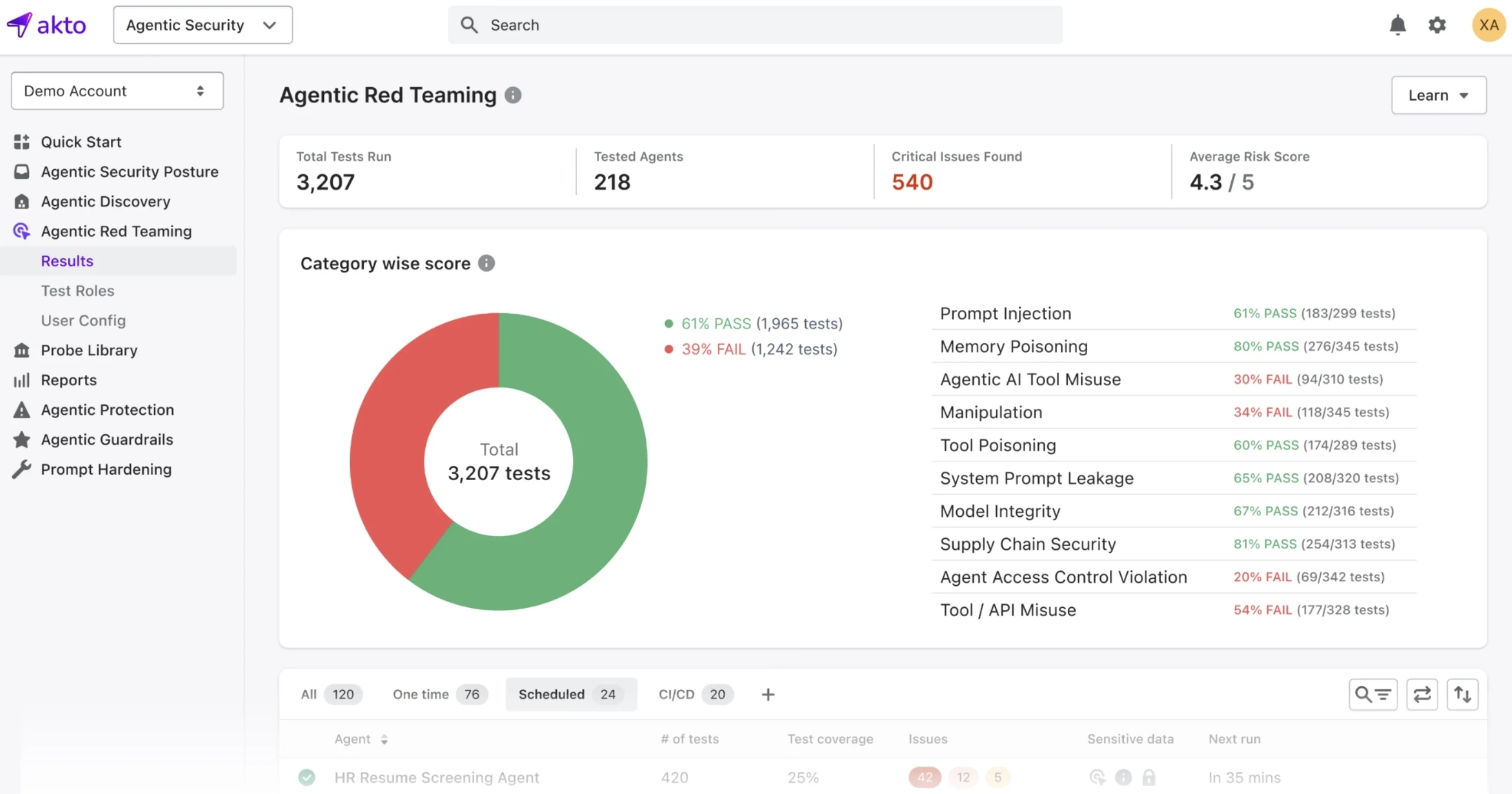
Manual pentests run once a quarter. However, MCP deployments change continuously. Automated red teaming closes that gap.
Prompt Injection Simulations
Run automated injection payloads through every data ingestion path your agents touch: tool responses, retrieved documents, external API outputs, and cached content. Test whether the agent follows injected instructions, and under what conditions guardrails fail.
Tool Abuse Testing
Simulate an attacker-controlled MCP server returning malicious tool descriptions. Verify whether your agents execute unexpected tool calls, whether those calls are logged, and whether any downstream authorization check catches them before execution.
Session Hijacking Simulations
Test session ID generation for predictability and reuse. Rapidly creating and destroying sessions to log IDs and wait for reassignment is an established attack pattern against MCP implementations that do not generate cryptographically secure session identifiers.Automated testing should verify this property on every deployment.
Authorization Bypass Testing
Attempt cross-tool actions that the current permission configuration should block. Test whether an agent operating under one tool's authorization scope can invoke capabilities belonging to another. Verify that token exchange happens at every trust boundary rather than being passed through from upstream callers.
Real-Time Runtime Protection and Guardrails

Blocking Prompt Injection Attempts
Filter for dangerous patterns, hidden commands, and suspicious payloads before they reach your LLM agents. Input validation at the ingestion layer is the first line of defense.
Preventing Unauthorized Tool Execution
Enforce an explicit allowlist of tool calls permitted within each workflow context. Any tool invocation that falls outside the expected call graph for a given task should be blocked and flagged, not just logged. Agents that can call arbitrary tools on demand are the same as applications with no authorization model.
Detecting Abnormal Agent Behavior
Establish baseline profiles for normal agent behavior per workflow: expected tools, call frequency, data volumes, and external endpoints. Deviations from baseline, especially sequences involving privileged tools or external communications, should trigger automated alerts rather than waiting for human log review.
Runtime Policy Enforcement
Proxy and audit calls to detect and block toxic agent flows before they trigger unintended tool use. Policy enforcement at the protocol layer means controls apply regardless of which model, agent framework, or MCP client is making the call. It is the only enforcement point that cannot be bypassed by changing how the agent is configured.
How Can Organizations Detect and Mitigate MCP Threats in Production?
Monitoring MCP Runtime Behavior
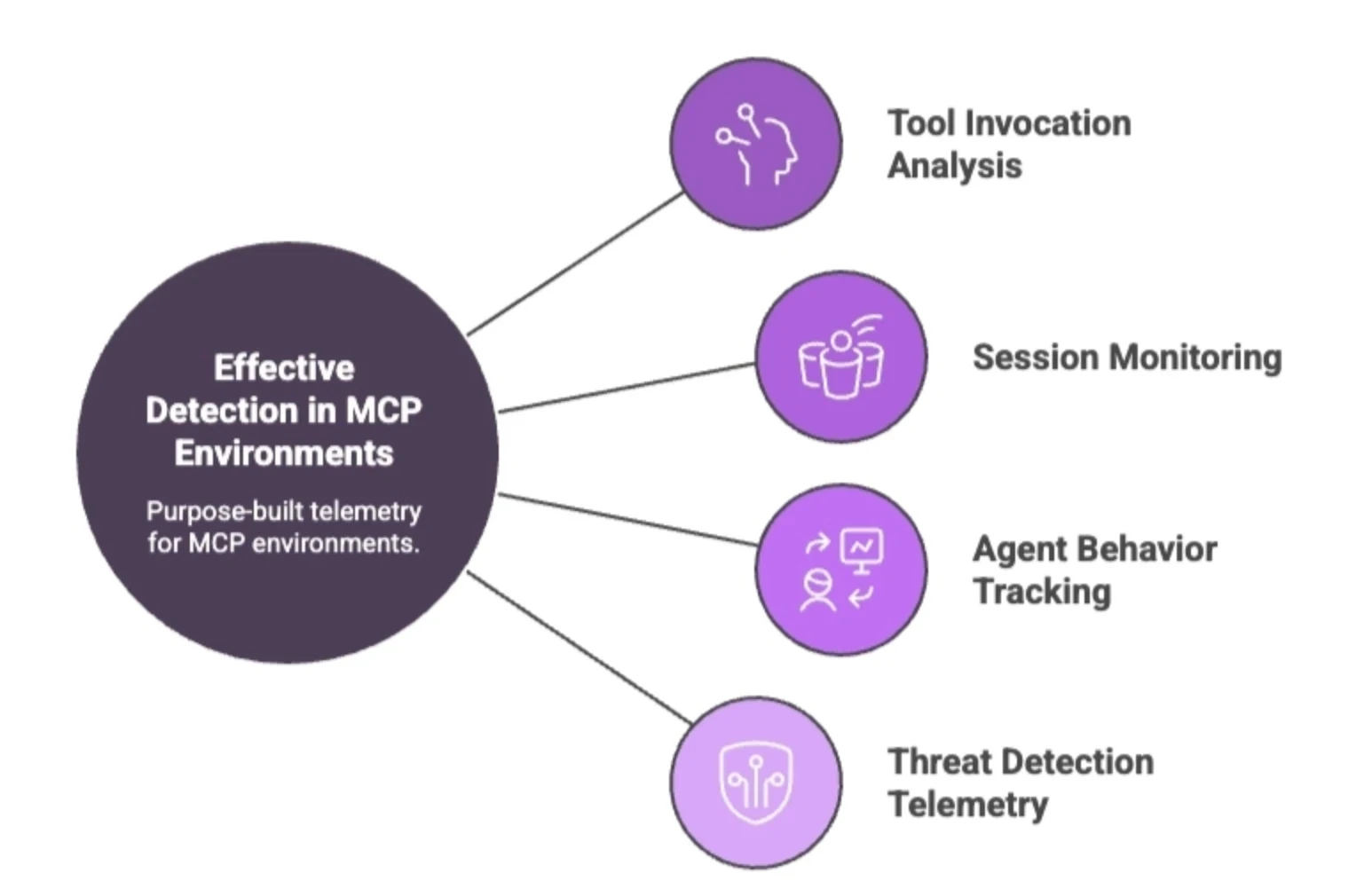
Effective detection in MCP environments requires purpose-built telemetry.
Tool invocation analysis: Log every tool call with its full argument set, the session it originated from, the agent that made it, and the prompt context that triggered it. Without this, you have no basis for distinguishing a legitimate call from an injected one.
Session monitoring: Track session lifecycle events including creation, token issuance, tool access patterns, and termination. Session hijacking and fixation attacks exploit weak session management, allowing attackers to take over authenticated sessions and perform actions as legitimate agents. Anomalies in session behavior are often the earliest detectable signal.
Agent behavior tracking: Build per-workflow baselines and alert on deviations: unexpected tool sequences, access to systems outside the task scope, and elevated call volumes that do not match normal operation.
Threat detection telemetry: MCP servers face threats from agents that can execute thousands of requests per minute, automatically learn from failures, and adapt behavior in ways that are difficult to detect with signature-based tooling. Detection needs to be behavioral and continuous, not signature-based and periodic.
Building Secure MCP Architectures
Security controls bolted on after deployment are less effective than constraints built into the architecture from the start.
The foundation is zero-trust.
Every trust boundary requires a token exchange. Tokens received from upstream callers should never be passed through directly. Every step in a multi-agent chain authenticates independently, regardless of what the previous hop already verified.
Isolation comes next.
MCP server processes should run in sandboxed environments with no access to host resources beyond what the specific tool requires
At the credential layer, use short-lived, scoped tokens tied to specific sessions, with expiration, rotation, and revocation policies enforced across the board.
Establishing Continuous Security Validation
MCP deployments are not static.
Tools get added, scopes drift, and server behavior changes after the initial approval. Point-in-time assessments do not keep up with that pace.
Runtime testing means running automated attack simulations against live deployments, not just in pre-production. Prompt injection payloads, malicious tool responses, and session manipulation attempts should be part of ongoing testing.
Configuration audits compare current MCP server configurations, tool scopes, and session settings against approved baselines on a regular schedule. Any deviation gets flagged for review before it becomes a production incident.
What are the Most Common MCP Security Pitfalls?
1. Overly Broad Tool Permissions
Agents accumulate permissions over time and nobody removes them. A tool scoped to files:* or admin:* on day one stays that way through every subsequent deployment. When that agent gets compromised, the blast radius is huge.
2. Insecure Token Handling
Tokens and credentials end up embedded in configuration files, environment variables, prompt templates, and model context memory, where they can be retrieved through user prompts, system recalls, or log inspection.
Credentials that were never meant to persist become persistent by default.
3. Lack of Runtime Visibility
Most MCP deployments produce no structured record of which tools were called, by which agent, with what arguments, and triggered by what prompt.
Without that telemetry, there is no detection and no forensic basis for incident response.
4. Weak Session Isolation
Session IDs that are predictable or reused let attackers inject commands into legitimate client sessions, directing agents to execute attacker-controlled instructions without any visible indicator to the user.
5. Untrusted MCP Plugins and Tools
Third-party MCP servers get installed, approved once, and never reviewed again. Tool descriptions change after approval. Dependencies carry malicious payloads.
6. Failure to Continuously Test MCP Environments
A pentest at deployment time does not account for tools added three weeks later, scopes that drifted, or server behavior that changed after a dependency update. MCP environments need ongoing adversarial testing and not one-time assessments.
Future Trends in MCP Security
Akto predicts the below future trends might emerge in MCP security:
Trend #1: AI-Native Runtime Security for MCP
Traditional security tooling was built for deterministic systems. MCP is not. The next generation of runtime protection will operate at the protocol layer, parsing JSON-RPC traffic and making policy decisions in real time.
Trend #2: Adaptive Authorization Systems
Authorization needs to evaluate not just who is asking, but what task is being performed and whether the tool call fits expected behavior for that workflow.
Enterprise MCP deployments are already driving demand for SSO-integrated flows, structured audit trails, and gateway patterns that scope data exposure explicitly.
Trend #3: Autonomous Threat Detection for Agentic AI
Action tools capable of directly modifying external environments grew from 27% to 65% of all MCP tools between November 2024 and February 2026.
That surface is expanding faster than human analysts can monitor. Threat detection will increasingly rely on behavioral models trained on normal agent workflows, identifying anomalous sequences without requiring a human-defined signature first.
Trend #4: Standardization of MCP Security Frameworks
NIST has announced the AI Agent Standards Initiative to create consensus around identity, security, and agent communication as agentic AI scales.
The OWASP MCP Top 10 is already the reference document for security reviews. What follows is formal compliance mapping: translating those frameworks into auditable controls that security programs can own, test, and report on.
Trend #5: The Future of Secure Model Context Protocol Ecosystems
The MCP ecosystem now spans over 10,000 active servers.
Every server is a potential entry point, and the protocol's composability means a weakness in one corner can propagate across the whole. Security programs that treat MCP as a developer tooling problem will stay permanently behind.
What Is the Essential MCP Security Checklist for AI Agents and Enterprise Deployments?
Follow this MCP security checklist to strengthen security, improve governance, and maintain secure AI agent operations.
Enforce strong authentication for MCP servers
Restrict tool permissions using least privilege
Validate trusted MCP plugins and dependencies
Monitor runtime behavior continuously
Detect prompt injection attempts in real time
Implement runtime guardrails and policy enforcement
Audit MCP configurations regularly
Continuously test MCP attack surfaces
Enable immutable audit logging
Conduct automated adversarial simulations
Final Thoughts on MCP Security Risks
Prompt injection, tool poisoning, confused deputy failures, session hijacking, and credential leakage are not theoretical risks.
They are critical real-time risks happening as we speak.
The attack surface is the protocol layer itself, and conventional security programs are not yet instrumented to see it.
Why Continuous Runtime Protection Matters
MCP environments change constantly. Tools, agents, workflows, etc., are comtantly changing.
And a security check at deployment time captures one moment in a continuously shifting system. Runtime protection is the only control that stays current with what is actually running in production.
Building Secure MCP Architectures for Agentic AI
Security built into the architecture is more effective than controls added down the line.
Akto gives AppSec teams the visibility and control to enforce that baseline across MCP deployments via continuous discovery of MCP assets, runtime monitoring of tool invocations, automated testing for prompt injection and authorization bypass, and policy enforcement at the protocol layer.
Preparing for Emerging MCP Threats in 2026
The security teams that will be ahead in 2026 are the ones instrumenting, testing, and enforcing controls against MCP right now.
Akto helps you get there with automated red teaming for MCP environments, runtime protection against prompt injection and tool abuse, and continuous visibility into your agentic attack surface.
Related Links

Experience enterprise-grade Agentic Security solution